|
|
|
|
Common Components Help | AEF Help |
Routes
Overview of Routes
A route is a set of tasks that users complete in order to accomplish a business activity. Routes can contain content that helps the route members complete their assigned tasks. For example, you might create a route to get a design specification reviewed and approved. You could include the design specification and other related documentation in the route. Some route members would have tasks for reviewing and commenting on the spec, others would have tasks for approving the spec.
The route creator defines each task to be completed and for each task, specifies:
- the order in which the tasks should be completed
- the name of the task
- the route member who should complete each task, called the task assignee; this can be a person or a role
- optionally, when each task is due
- the action the task assignee should perform, such as approve, comment, investigate
- specific instructions for how the person should complete the task
- whether the task assignee can delegate the task to someone else
- whether the route creator needs to review the task before it is completed
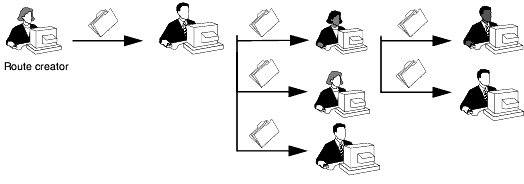
More than one task can be active within a route at one time or tasks can become active sequentially, after each member completes a task. If more than one task is active at once, the route creator can specify whether only one task needs to be complete or they all must be complete before the next set of tasks become active.
You can create routes with tasks that should be completed sequentially . . .
or with tasks that should be completed simultaneously.
When the route creator starts a route, the system activates all tasks with an order number of 1 and notifies the assignee for each task. If the assignee is a group or role, one member of the group or role must accept the responsibility for the task. That person then becomes the task assignee. The assignees can then access the task to see the instructions, view and edit content in the route (as allowed based on the access they have for each content item), and enter comments and an approval status (as allowed/required based on the actions specified by the route creator). When the assignees mark the task as complete, the system creates a task for the next person in the route and so on.
You can simplify the process of creating similar routes by saving routes as templates. A route template contains the frequently reused components of a route, such as the route description, members, task order, and instructions.
|
|
|
|
| Last updated: 04/20/04 14:50:42 |