|
|
|
|
Common Components Help | AEF Help |
Downloading a File Package
All users with read access to an EBOM's component parts can generate and download a package of files connected to a part and its associated objects. The download file is a .zip file for Windows or UNIX.
! This is a System Administrator configuration option, so you may not see the Download Package link. The Download Package wizard displays a table showing all document objects (part, CAD model, CAD drawing, drawing print, reference document) for which you have read access and that are related to the parent part, to the level specified. It also shows files that are checked in to those objects. You can:
- Specify levels to include in the package.
- Select specific documents for the package.
- Download the package to your computer.
- Access a part Bill of Materials page. See your application documentation for viewing a part bill of materials.
- Click Download Package from the page toolbar.
The Download Package wizard opens.
- Type the number of levels of associated objects you want to choose files from, or click All Levels to include all levels below the selected part.
- Click Next.
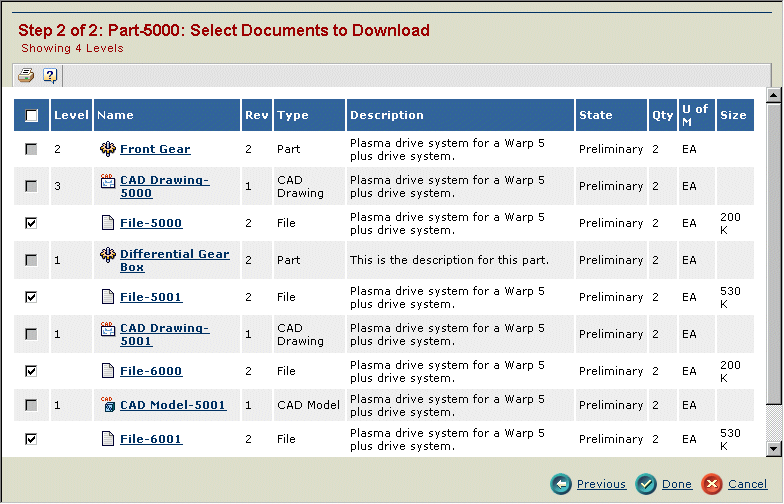
The Select Documents to Download page shows all document objects related to the part to the specified level, including files checked in to those objects.
- Check each file that you want to include in the package to download. Check boxes for items other than files are gray and cannot be selected.
- Click Done to generate the package.
The standard Windows Save As window opens.
- Enter a name for the .zip file and specify the location where you want the file to be saved on your computer, then click Save.
|
|
|
|
| Last updated: 04/20/04 14:50:29 |