|
|
|
|
Common Components Help | AEF Help |
Overview of Team Central Accesses
Team Central lets Workspace Leads control access to all the main components of a workspace, including the workspace itself, folders and subfolders, routes, content in folders (which can also be included in routes), and discussions.
This section overviews important points to understand about the entire access model. For instructions on how to define accesses for each component, see:
- Defining a Member's Workspace and Default Accesses
- Defining Access to Folders and Subfolders
- Defining Access to a Discussion
Important Points Regarding Accesses
- All people added to a workspace have Basic access to it. This means they can view the workspace category list and Properties page, can create workspace-level discussions and participate in those discussions, can be added to workspace-scope routes, and can be added as meeting attendees. People with Basic access do not have access to any folders or content by default but Workspace Leads can give them access on a folder by folder basis.
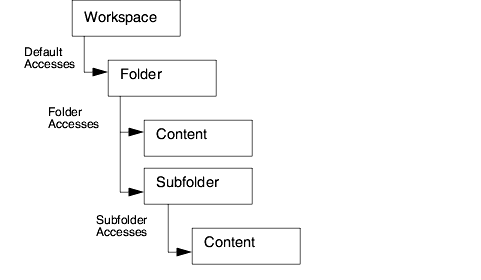
- One of the most important points to remember when assigning accesses is that accesses are inherited down the data hierarchy. A member's default access for workspace content, which is set at the workspace level, defines the minimum access that person/role has for every folder. If not explicitly set, this is None. A member's access for a folder defines the minimum access the person/role has for every subfolder, and the member's folder/subfolder access defines the minimum access for every document in it (the folder access defines the exact access for non-document content items). The accesses for a content item apply even when the member accesses the item from a route or from another application. These minimum accesses can be added to but cannot be removed except by removing access on the parent item.
- When you make any change to a person's access level at one point in the data hierarchy, the new access level replaces all inherited access down the data hierarchy and any additional accesses added at lower levels are removed.
For example, suppose a workspace member has Read access as the default access for the workspace and is given additional Add access to a folder. If you change the person's default workspace access, either making it higher (for example, Read Write) or lower (for example, Basic) the person's inherited access to the folder will now be the new default access and the additional access of Add is removed. Removing the additional access occurs whenever the access at the higher level is reset, regardless of whether the change is to a higher or lower access level.
- Workspace Leads can give members additional accesses to a folder (accesses that are not inherited from the parent folder or subfolder) as long as the member has at least Read access to the parent folder or subfolder. Similarly the owner of a document in a folder can give members who have at least Read access to the folder additional access to the document. Requiring at least Read access to the folder prevents a member from having access to content but not having access to the subfolder that contains it or having access to a subfolder but not to the parent folder.
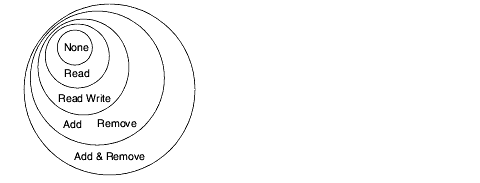
- Access levels build upon one another so when people are assigned one access level, they have all the permissions allowed in the lower levels, as shown in the below diagram.
- When a discussion is created, all the members who have at least Read access to the item being discussed can access the discussion. The discussion creator can remove people from the access list as needed.
- You cannot deny access per content item. A person's access for folder content is inherited from the folder access and this inherited access cannot be removed. So everyone who has at least Read access to a folder has at least Read access to every item in the folder and this access cannot be removed except by removing access on the folder.
- Routes do not inherit accesses from any other workspace component. The access levels assigned for a route are for the route itself (such as the ability to add and remove content from the route) and are separate from accesses for the route content. For example, a route member who has Add access for a route can view the route and add content to it. But the accesses the person has to each content item in the route depends on the accesses assigned within the item's folder. The person might have no access to one item, Read Write access to another, and Remove access for another. All these accesses are independent of the route access.
- Accesses for non-document folder content (RFQs, packages, quotations) cannot be controlled per item. A member's access to non-document content is the same as the person's folder access. Additionally, Team Central accesses add to accesses given by Sourcing Central. They do not restrict access given by Sourcing Central.
|
|
|
|
| Last updated: 03/30/04 13:47:35 |