|
|
|
|
Entering Dates Using the Calendar
The Calendar tool is available throughout the MatrixOne applications whenever a date is required for a field. Picking a date from a calendar prevents you from having to remember specific date formats.
To select a date from the calendar
- From any page that has a field that requires a date, click the Calendar
icon to the right of the field.
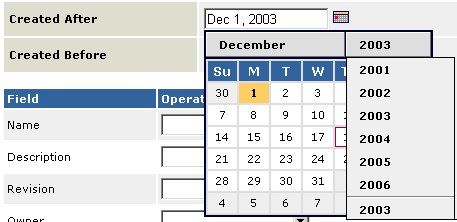
The calendar drops down from its present location. It shows the current month and year with the current day highlighted.
- To change the month/year, click its name and select a month or year from the drop-down list.
- When the desired month and year are displayed, click the day of the month.
The calendar automatically closes and displays the date you selected in the proper format in the text field.
|
|
|
|
| Last updated: 04/22/04 17:05:14 |