|
|
|
|
Two Kinds of Table Pages
Table pages can contain a top level list or a list of items specific to another item. All My Desk links present table pages with top-level lists of items, such as all RFQs for a buyer's company or all quotations for a supplier's company.
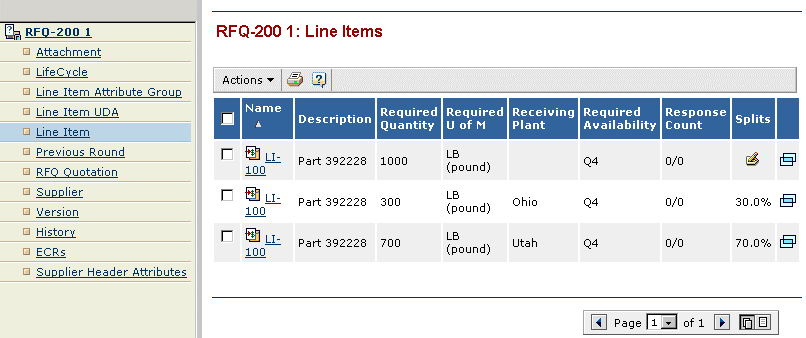
In contrast, when you access a table page by clicking a category in the Context Navigator, the table shows items related to the item that the category is for. For example, when a buyer clicks the Line Items category for an RFQ called RFQ-200, the table page that opens shows all line items for RFQ-200, as shown below. Notice the heading for the table page shows the name of the item in the Context Navigator (RFQ-200) and the type of information in the table (Line Items).
No matter which kind of table you are working with, clicking the name of an item in the table (or clicking the Popup icon for an item) adds the item and its categories to the Context Navigator. See Getting More Information about an Item (Using the Context Navigator).
|
|
|
|
| Last updated: 04/22/04 17:04:25 |